ShopDreamUp AI ArtDreamUp
Deviation Actions


Suggested Deviants


Suggested Collections


You Might Like…



Description
 New Version
 [link]
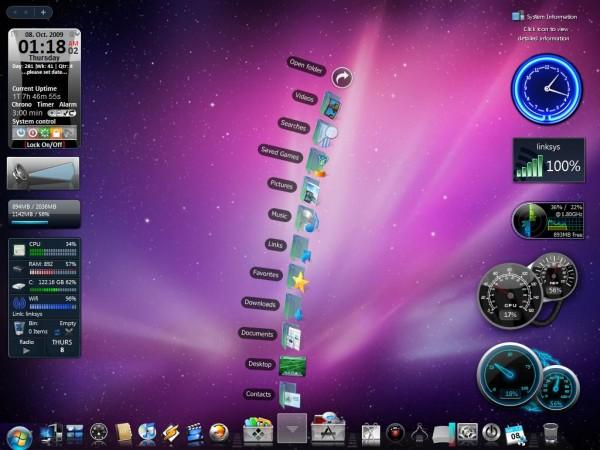
This Is A Desktop Theme On Windows Vista, I Designed After Mac OSX Leopard.
Instructions
frist depending on your windows, you'll need to run those download the theme patcher for your version of windows, then install and run the exe file, then with vista glazz after u run that, and patch all three u can uninstall vista glazz and when it asks you if u want to leave the files patched click yes. then download the RK laucher and the wallpaper and install the RK laungher and add the icons by right clicking the icons and chaging the icon, and apply the wallpaper, for xp users try google gadgets for the sidebar and gadgets for vista users you just need to get them through the microsoft get more gadgets option. for more icons just google them if any problems just messege me or email me at wallybescotty@gmail.com i'll be happy to help.
Here are the links to make it for vista, the gadgets are all found on the windows gadget website, u can look for mine or mix it up.
*note*
visual styles go in this path/or place/Folder if this makes more sense
C:\Windows\Resources\Themes
Icons For XP and Vista "not PNG format they are ICO files"
[link]
Wallpaper Link
[link]
![[link]](https://www.deviantart.com/users/outgoing?http://i62.photobucket.com/albums/h85/sazmo_2004/VistaLeopardremix2.jpg)
Visual Style Link
[link]
RK Launcher Link
[link]
Vista theme patch link
[link]
Here are the links for windows xp
XP Visual Syle link
[link]
XP theme patcher
[link]
Image size
600x450px 39.83 KB
Comments56
Join the community to add your comment. Already a deviant? Log In

amamzing theme~~